
Comau India Private Limited recruitment for B.Tech (Mech, EE,EEE) 2023 yop. Scheduled round 3 for the shortlisted students.
Dear Students,
Please find the scheduled Round 3 for the shortlisted students :-
| CANDIDATE NAME | GENDER | COURSE | STREAM | BATCH | |
| RONAK KUMAR SHARMA | MALE | B.E/B.TECH | EEE | 2023 | [email protected] |
| GOVIND PANDEY | MALE | B.E/B.TECH | EEE | 2023 | [email protected] |
NextGen Ventures: Schedule Round 1
Recruiting Organization: Comau India Private Limited
Dear Students,
Please find the schedule for Online Test (Elimination Round) for the eligible candidates (list attached) :
Course/Streams: B.E./B.Tech (Mechanical or Electrical or Mechatronics)
Batch: 2023 passing out batch
Eligible Candidates List_TAT (1)
Recruitment/Selection Activity:
Eligible Candidates List_TAT (1)
Recruitment/Selection Activity:
-
- Online Test (To be conducted by NextGen Ventures)
Online Test Date (Day 01): 17th June, 2023
Registration Link: https://forms.gle/
Please copy and paste the registration link on a note pad and then paste the link on the browser
Once the registration process is completed, the candidates will get access to the Test Link
The Registration process will begin from 10:40 am
The test will begin from 11 am
The Test Time will be calculated when the candidates enter the first question
Registration Link: https://forms.gle/
Please copy and paste the registration link on a note pad and then paste the link on the browser
Once the registration process is completed, the candidates will get access to the Test Link
The Registration process will begin from 10:40 am
The test will begin from 11 am
The Test Time will be calculated when the candidates enter the first question
Test Venue: Candidates can appear for the test from their respective location
Test Information/Instructions:
- The candidate should clear the browsing history, cache & cookies of the browser before starting the Exam.
- It is also advisable that they need to be in strong network area to avoid internet issues during the Exam.
- Before starting the Exam, kindly ensure that the screensaver is disabled in respective systems.
- It is advisable for the candidates to take the Exam from their PC/Laptops only.
- Every candidate needs to Login as New Registration (If the candidate is accessing the Exam portal for the First Time) using their Email ID (Preferebly GMAIL ID) & Mobile Number (as provided by the candidates).
- During Registration, Candidates needs to Select Exam ( Group ) which will show NextGen Ventures.
- During Registration, please use abbreviations wherever possible. For e.g, if any candidates belongs to to Computer Science Engineering Streams, please mention CSE
- Kindly use abbreviations in the Institute name section as well
- For Electrical Candidates, the Test Consists of 50 MCQs
- For Mechanical Candidates, the Test Consists of 55 MCQs
- The Duration of the test is 60 Minutes (for both the streams)
- Please Click the Right Option for marking answers.
- Kindly click ‘Save & Next’ button after every answer.
- The Panel will turn Green for every submitted answers.
- Candidates can toggle between sections or questions within the section, but for registering every answer, the ‘Save & Next’ button needs to be clicked.
- Ensure that the personal data is entered correctly.
- The Exam will run in FULL SCREEN MODE. Exam will be automatically submitted if you come out of the full screen mode.
- Do not Open Any Other Webpage during the Exam.
- Exam will be discontinued, if any other Webpage is accessed.
- If a candidate suddenly logs out of the exam due to any reason, the candidate needs to click on the exam link and click on the option ‘Already have an account’.
- The candidates must remember their email id & password for further/future test processes.
- Candidates need to copy and paste the test link on the address bar to run the test.
- For any technical quarry / help please call on this no: 7595096473
Day 02: Will be notified duly
Detailed schedule and process flow will be notified duly
Detailed schedule and process flow will be notified duly
Dear Students,
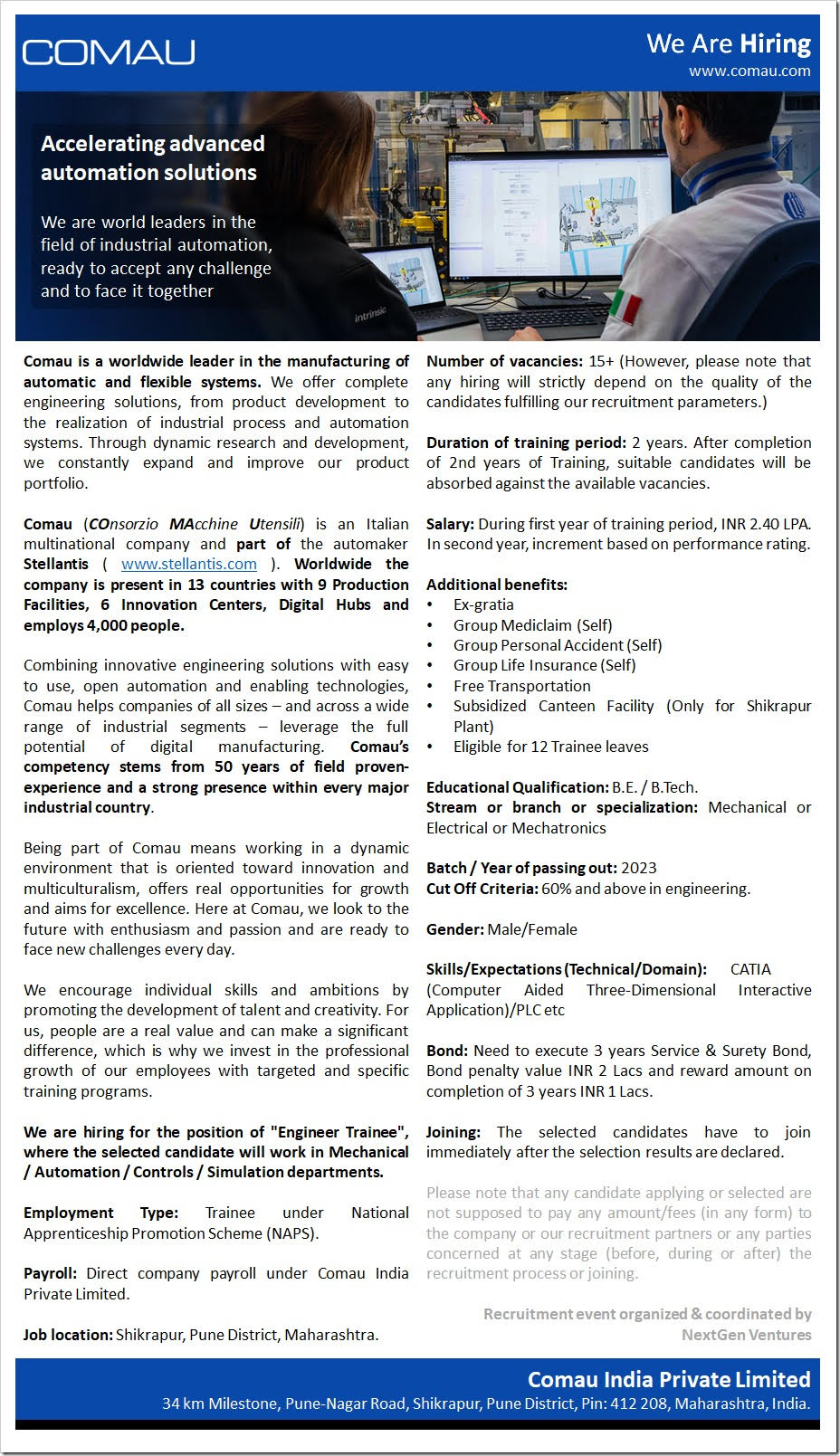
NEXTGEN VENTURES has been given the responsibility of organizing & coordinating a “Recruitment Drive (Online/Offline Mode)” by & for “Comau India Private Limited”
Please refer to the attached file for complete details about the Joint Recruitment Drive.
Educational Qualification: B.E. / B.Tech.
Stream or branch or specialization: Mechanical or Electrical or Mechatronics
Batch / Year of passing out: 2023
Cut Off Criteria: 60% and above in engineering.
Skills/Expectations (Technical/Domain): CATIA (Computer Aided Three-Dimensional Interactive Application)/PLC etc
Gender: Male/Female
Recruitment/Selection Process:
Comau India Private Limited will follow the following Selection Procedure while recruiting the candidates against the vacancies as mentioned above:
Step 01: Interested candidates have to apply online at the link sent by NextGen Ventures (along with updated resume and photograph). NextGen Ventures will also conduct online Pre-recruitment briefing to the candidates as and when required.
Step 02: Application level screening (To be conducted by recruiting company/NextGen Ventures | Elimination Round)
Step 03: Preliminary Online Screening process consisting of Aptitude + Technical Test (To be conducted by NextGen Ventures | Optional Elimination Round)
Step 04: Company Presentation & Q&A Session (To be conducted by recruiting company officials | Online Mode or F2F)
Step 05: Technical Interview Rounds (To be conducted by recruiting company officials | Online Mode or F2F | Elimination round)
Step 06: HR & Final Interview Rounds (To be conducted by recruiting company officials | Online Mode or F2F | Elimination round)
Step 07: Finalization of candidates & declaration of final selected candidates list.
Step 08: Offer letters/letter of intent (LOI) of hiring/selecting the candidate will be issued subsequently.
Step 09: On boarding.
Registration Link: https://forms.gle/
Last Date of Online Application : 12th’ June 2023
The complete schedule, contact person etc will be informed in due time.
