
Amara Raja Group – Internship-Cum-Job-Opportunity – B. tech (EE,EEE,MECH,CIVIL) 55% and above in Engineering 2022 & 2023 YOP. Register before 27.11.22.
Dear Students,
Please find the schedule for Online Test (Elimination Round) for the eligible candidates (list attached) :
Course/Streams: B.Arch / B.E. / B.Tech (Architecture, Civil, Electrical – EE & EEE, Mechanical)
Batch: 2022 Passed out batch &2023 passing out batch
Recruitment/Selection Activity:
-
- Online Test (To be conducted by NextGen Ventures | Elimination Round)
Online Test Date (Day 01): 2nd December, 2022 (Friday)
Registration Cum Test Link: https://forms.gle/
Online Test Timing: 11:00 am
Registration Cum Test Link: https://forms.gle/
Online Test Timing: 11:00 am
Test Venue: Candidates can appear for the test from respective location
Please Note:
-
-
After the registration process is completed and candidate clicks on Submit, the candidates will get access to the Test Link
- Candidates need to copy and paste the link in the address bar to proceed with the test.
-
-
- Registration Link will be active from 10:45 am
- Registration Link will be active from 10:45 am
-
- The Test link will be active at 11 am
- The Test link will be active at 11 am
-
- The Test Time will be calculated when the candidate enters the first question
- The Test Time will be calculated when the candidate enters the first question
Test Information/Instructions:
-
- The candidate should clear the browsing history, cache & cookies of the browser before starting the Exam.
-
- It is also advisable that they need to be in strong network area to avoid internet issues during the Exam.
-
- Before starting the Exam, kindly ensure that the screensaver is disabled in respective systems.
-
- It is advisable for the candidates to take the Exam from their PC/Laptops only.
-
- Every candidate needs to Login as New Registration (If the candidate is accessing the Exam portal for the First Time) using their Email ID (Preferebly GMAIL ID) & Mobile Number (as provided by the candidates).
-
- During Registration, Candidates needs to Select Exam ( Group ) which will show NextGen Ventures.
-
- The test consists of 40 MCQ type questions.
-
- The Duration of the test is 40 minutes
-
- Please Click the Right Option for marking answers.
-
- Kindly click ‘Save & Next’ button after every answer.
-
- The Panel will turn Green for every submitted answers.
-
- Candidates can toggle between sections or questions within the section, but for registering every answer, the ‘Save & Next’ button needs to be clicked.
-
- Ensure that the personal data is entered correctly.
-
- The Exam will run in FULL SCREEN MODE. Exam will be automatically submitted if you come out of the full screen mode.
-
- Do not Open Any Other Webpage during the Exam.
-
- Exam will be discontinued, if any other Webpage is accessed.
-
- If a candidate suddenly logs out of the exam due to any reason, the candidate needs to click on the exam link and click on the option ‘Already have an account’.
-
- The candidates must remember their email id & password for further/future test processes.
- Candidates need to copy and paste the test link on the address bar to run the test.
______________________________________________________________________________________________
Dear Students,
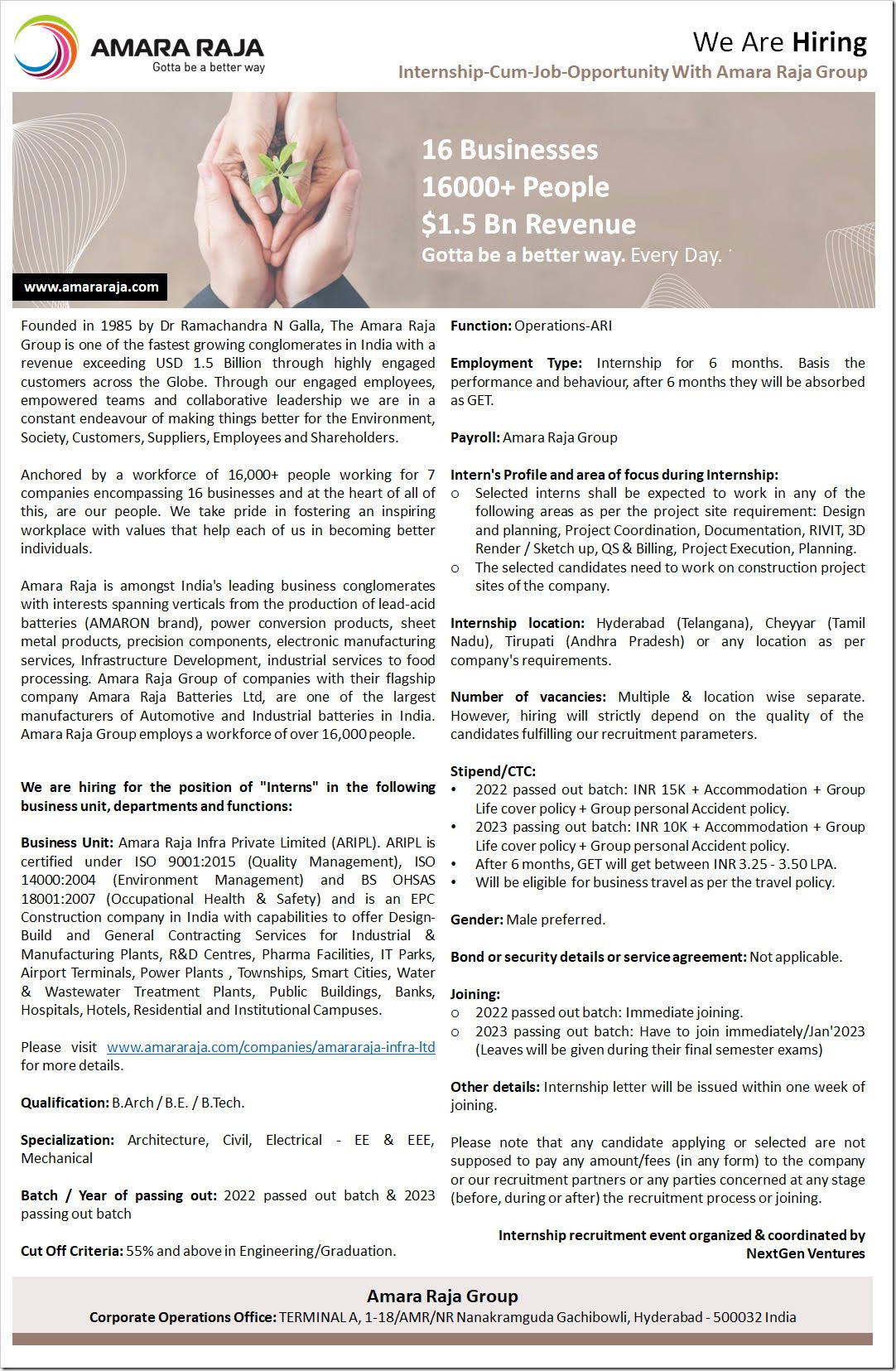
NEXTGEN VENTURES has been given the responsibility of organizing & coordinating a “Internship Recruitment Drive (Online/Offline Mode)” by & for “Amara Raja Group” .
Please refer to the attached file for complete details about the Joint Recruitment Drive.
Qualification: B.Arch / B.E. / B.Tech.
Specialization: Architecture, Civil, Electrical – EE & EEE, Mechanical
Batch / Year of passing out: 2022 passed out batch & 2023 passing out batch
Cut Off Criteria: 55% and above in Engineering/Graduation.
Gender: Male preferred.
Joining:
2022 passed out batch: Immediate joining.
2023 passing out batch: Have to join immediately/Jan’2023 (Leaves will be given during their final semester exams)
Recruitment/Selection Process:
Amara Raja Group will follow the following selection procedure while recruiting the candidates against the vacancies as mentioned above:
Step 01: Interested candidates have to apply online at the link sent by NextGen Ventures (along with updated resume and photograph). NextGen Ventures will also conduct online Pre-recruitment briefing to the candidates as and when required.
Step 02: Preliminary Online Screening process consisting of Aptitude + Technical Test (To be conducted by NextGen Ventures | Elimination Round)
Step 03: Company Presentation & Q&A Session (To be conducted by recruiting company officials | Online Mode or F2F) – Only for shortlisted interns in the first round.
Step 04: Amara Raja may further shortlist candidates from the above process based on company’s internal criteria.
Step 05: HR & Technical interview (To be conducted by company officials through any virtual communication mode | Elimination Round)
Step 06: Finalization of candidates & declaration of final selected candidates list for internship.
Step 07: Onboarding. Appointment letter will be issued within a week after reporting to duties.
Registration Link: https://forms.gle/
Last Date of Online Application : 27th’ November 2022
The complete schedule, contact person etc will be informed in due time.
